Authentication
All requests to the Third Party API must be authenticated. Your authentication details are tied to your identity within the RoyalABC Admin Portal. This means that you are only authorized to perform actions on behalf of your organization and any access tokens you obtain will be scoped to your organization. Please take care to keep your client secret secure and do not share it with anyone. We reserve the right to revoke your access at any time if we suspect this system is being abused.
Note
To use the API you must first have a valid Distributor Admin account. If you do not have an account, please contact us.
Creating an OAuth Client Secret
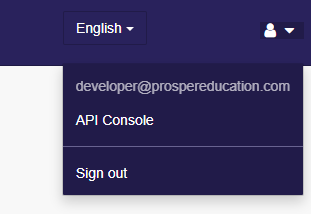
To access the Third Party API you must first create a OAuth Client Secret. This is done by logging into the RoyalABC Admin Portal as a Distributor and opening the API console at the top right.
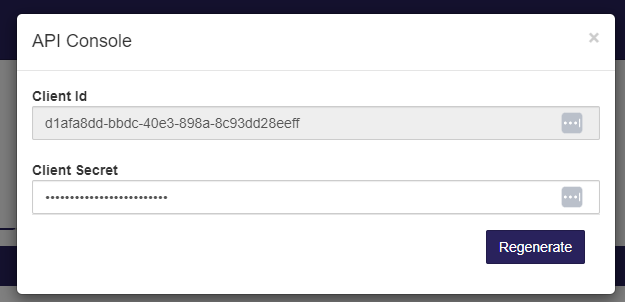
The API console will show you your Client ID, and a button to generate a new Client Secret. Upon generating a new Client Secret, you will only be shown the secret once. Please make sure to copy the secret and store it in a secure place. If you lose the secret, you must generate a new one.
Authenticating with the API
To interact with the API you must first obtain a valid access token. Prosper Education runs an OIDC compliant OAuth 2.0 Server at the following addresses
- Production: https://global.royalabc.com/auth/
- Staging: https://staging.royalabc.com/auth/
With OIDC you may use the discovery document to obtain the OAuth 2.0 endpoints. The discovery endpoint is located at
/.well-known/openid-configuration. For example, to obtain the endpoints for the production server you would make a
HTTP GET request to https://global.royalabc.com/auth/.well-known/openid-configuration.
To authenticate with the API you must use the client_credentials grant type. The following parameters are required:
client_id- The Client ID obtained from the API consoleclient_secret- The Client Secret obtained from the API consolescope- The scope of the access token. For the Third Party API this isThirdPartyApigrant_type- The grant type. For the Third Party API this isclient_credentials
Using Identity Model
Our preferred method of obtaining an access token is to use the IdentityModel library. This library is available for .NET, .NET Core, and .NET Standard. The following code snippet shows how to obtain an access token
using System.Net;
using IdentityModel.Client;

var tokenResponse = await _httpClient.RequestClientCredentialsTokenAsync(new ClientCredentialsTokenRequest
{
    // Note, this address can be found on the Discovery Document,
    // you can retrieve this from the extension method 'GetDiscoveryDocumentAsync'
    Address = "https://global.royalabc.com/auth/connect/token",
    ClientId = "YOUR_CLIENT_ID",
    ClientSecret = "YOUR_CLIENT_SECRET",
    Scope = "ThirdPartyApi"
});

if (tokenResponse.IsError)
{
    // Handle error
}

var accessToken = tokenResponse.AccessToken;
Once you have retrieved a token, you may optionally use the HttpClient extension methods provided by IdentityModel to make any subsequent request. The following code snippet demonstrates this:
...
var client = new HttpClient();
client.SetBearerToken(tokenResponse.AccessToken);

var request = new HttpRequestMessage(HttpMethod.Get, "https://global.royalabc.com/thirdparty/FederatedAuthentication");
var response = await _httpClient.SendAsync(request);

// handle response
Using cURL
You may also use cURL to obtain an access token. The following command will obtain an access token from the production server:
curl -d 'client_id=YOUR_CLIENT_ID' -d 'client_secret=YOUR_CLIENT_SECRET' -d 'scope=ThirdPartyApi' -d 'grant_type=client_credentials' https://global.royalabc.com/auth/connect/token
Upon success you should receive a JSON object containing the access token:
{
    "access_token": "eyJhbGciOiJSUzI1NiIsImtpZCI6IjZGOUVF..",
    "expires_in": 3600,
    "token_type": "Bearer",
    "scope": "ThirdPartyApi"
}
When sending requests to the Third Party API you must include the access token in the Authorization header. The following cURL command demonstrates this:
curl -X 'POST' \
  'https://global.royalabc.com/thirdparty/FederatedAuthentication' \
  -H 'accept: */*' \
  -H 'Authorization: Bearer YOUR_ACCESS_TOKEN' \
  -H 'Content-Type: application/json' \
  -d '{
  "subject": "00000000-0000-0000-0000-000000000000",
  "brandName": "RoyalABC",
  "application": "RoyalABCWorld",
  "nonce": "12345"
}'
Note the need for Bearer to be placed infront of the Access Token in the Authorization header.
Troubleshooting
Requests using an Access Token Return a 401 Unauthorized
Access tokens are valid for 1 hour. If you receive a 401 Unauthorized error, please ensure that you are using a valid access token, we recommend obtaining a new access token every ~55 minutes to ensure that you do not run into this issue. We do recommend caching access tokens locally to avoid making unnecessary requests to the OAuth server.
In some cases, you might receive a 401 Unauthorized or 403 - Forbidden error if you are attempting to access a resource that you do not have access to. Please ensure that you are using the correct Client ID and Client Secret and that your request parameters are correct. If problems persist please contact us.
Invalid Client Credentials
If you receive an error stating that your client credentials are invalid, please ensure that you are using the correct Client ID and Client Secret. If problems persist please contact us.
Invalid Scope
If you receive an error stating that the scope is invalid, please ensure that you are using the correct scope.
The scope should always be ThirdPartyApi. If problems persist please contact us.
Invalid Grant Type
If you receive an error stating that the grant type is invalid, please ensure that you are using the correct grant type.
The grant type should always be client_credentials. If problems persist please contact us.
API Requests Return a 401 Unauthorized
Check that you are including the access token in the Authorization header, after Bearer. If problems persist please contact us.